> For the complete documentation index, see [llms.txt](https://help.firstline.cc/llms.txt). Markdown versions of documentation pages are available by appending `.md` to page URLs; this page is available as [Markdown](https://help.firstline.cc/feature/utils/message-template.md).
# 訊息範本
{% hint style="info" %}
**2026 年第三季度功能調整**
訊息範本的「捷徑」使用方式已進行調整。新版操作需要先在訊息輸入框輸入 `/`,再輸入範本捷徑或關鍵字,例如 `/opening`。
若您的 FIRST LINE 尚未套用此版本,實際操作方式可能會與本頁說明略有不同。
{% endhint %}
## 新增範本
在 FIRST LINE,您可以預先建立常用的訊息內容,讓專員在回覆客戶時快速套用。
首先,從左側選單中選擇「系統」,然後點擊「輔助功能」下的「訊息範本」,即可進入範本管理列表。在這裡,您可以查看所有現有範本,也可以點擊列表右側的「新增範本」建立新的訊息範本。
若需要修改既有範本,可點擊範本旁的「編輯」進行調整。
 ## 編輯範本
進入範本編輯頁面後,可以設定範本名稱、描述及實際要套用的訊息內容。
#### 基本設定
| 必填 | 欄位 | 說明 |
| -- | ---- | --------------------- |
| ✓ | 範本名稱 | 請為範本設定容易辨識的名稱。 |
| | 描述 | 可補充範本用途,協助專員快速了解適用情境。 |
#### 範本內容
| 欄位 | 說明 |
| -- | ------------------------------------------- |
| 捷徑 | 設定此範本的快捷文字。專員可以在訊息輸入框輸入 `/` 後,再輸入捷徑快速搜尋此範本。 |
| 訊息 | 請撰寫預設範本訊息。可以使用 Hash值。 |
例如將捷徑設定為 `opening`,之後即可在訊息輸入框輸入 `/opening`,快速找到對應的訊息範本。
## 使用訊息範本
完成範本設定並儲存後,在與客戶對話時,可以透過以下方式套用訊息範本。
### 從訊息選單選擇
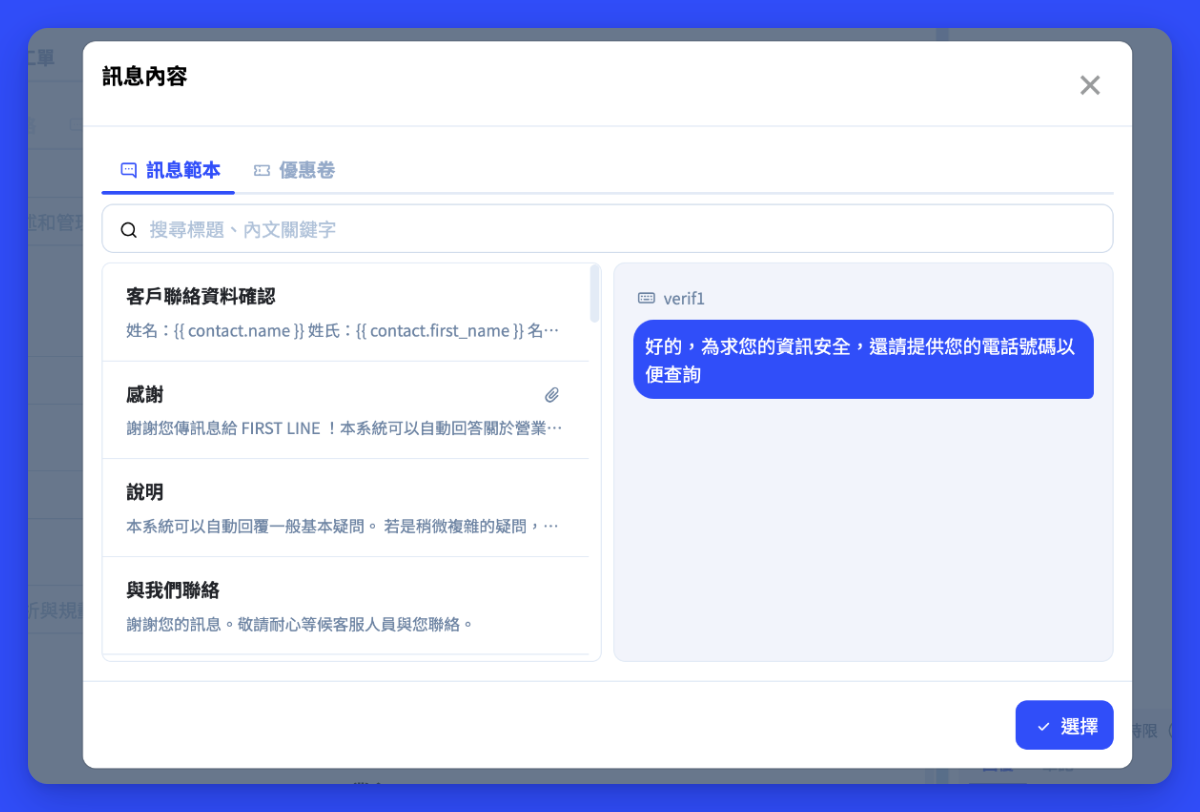
點擊對話視窗右下角的「訊息選單」,系統會顯示已建立的範本列表。選擇需要的範本後,內容會直接帶入目前的文字輸入框,您仍可以在送出前進一步編輯。
## 編輯範本
進入範本編輯頁面後,可以設定範本名稱、描述及實際要套用的訊息內容。
#### 基本設定
| 必填 | 欄位 | 說明 |
| -- | ---- | --------------------- |
| ✓ | 範本名稱 | 請為範本設定容易辨識的名稱。 |
| | 描述 | 可補充範本用途,協助專員快速了解適用情境。 |
#### 範本內容
| 欄位 | 說明 |
| -- | ------------------------------------------- |
| 捷徑 | 設定此範本的快捷文字。專員可以在訊息輸入框輸入 `/` 後,再輸入捷徑快速搜尋此範本。 |
| 訊息 | 請撰寫預設範本訊息。可以使用 Hash值。 |
例如將捷徑設定為 `opening`,之後即可在訊息輸入框輸入 `/opening`,快速找到對應的訊息範本。
## 使用訊息範本
完成範本設定並儲存後,在與客戶對話時,可以透過以下方式套用訊息範本。
### 從訊息選單選擇
點擊對話視窗右下角的「訊息選單」,系統會顯示已建立的範本列表。選擇需要的範本後,內容會直接帶入目前的文字輸入框,您仍可以在送出前進一步編輯。
 ### 使用 `/` 快速搜尋範本
如果已經知道要使用的範本,可以直接透過鍵盤快速搜尋。
1. 在訊息輸入框輸入 `/`,系統會顯示目前可以使用的文字範本。
2. 繼續輸入範本捷徑或關鍵字,例如 `/opening`,系統會依照輸入內容篩選符合的範本。
3. 使用鍵盤 `↑`、`↓` 選擇需要的範本,也可以直接使用滑鼠點擊選擇。
4. 按下 `Enter` 套用範本。選定後,範本內容會帶入訊息輸入框,確認或調整內容後即可送出。
{% hint style="info" %}
目前 `/` 快捷搜尋僅支援「文字」類型的訊息範本。
{% endhint %}
### 使用 `/` 快速搜尋範本
如果已經知道要使用的範本,可以直接透過鍵盤快速搜尋。
1. 在訊息輸入框輸入 `/`,系統會顯示目前可以使用的文字範本。
2. 繼續輸入範本捷徑或關鍵字,例如 `/opening`,系統會依照輸入內容篩選符合的範本。
3. 使用鍵盤 `↑`、`↓` 選擇需要的範本,也可以直接使用滑鼠點擊選擇。
4. 按下 `Enter` 套用範本。選定後,範本內容會帶入訊息輸入框,確認或調整內容後即可送出。
{% hint style="info" %}
目前 `/` 快捷搜尋僅支援「文字」類型的訊息範本。
{% endhint %}
 ## 為什麼需要先輸入 `/`?
新版將 `/` 作為訊息範本的快捷入口,可以更清楚地區分「一般文字輸入」與「搜尋範本」。
這項調整也帶來幾個操作上的改善:
* **操作更順手:** 搜尋範本後,可以直接使用 `↑`、`↓` 與 `Enter` 完成選擇,減少鍵盤與滑鼠來回切換。
* **減少輸入干擾:** 輸入 `/` 後才開始搜尋範本,一般打字時不會一直出現範本提示。
* **為更多快捷功能做準備:** 未來輸入框將支援更多功能,例如 `@` 提及。透過不同符號區分不同操作,可以降低功能之間互相衝突的情況,也更容易理解目前正在使用的功能。
如果經常使用固定範本,建議替常用範本設定簡短、容易記憶的捷徑,例如 `opening`、`refund` 或 `closing`,即可透過 `/opening`、`/refund` 或 `/closing` 快速搜尋並套用。
## 為什麼需要先輸入 `/`?
新版將 `/` 作為訊息範本的快捷入口,可以更清楚地區分「一般文字輸入」與「搜尋範本」。
這項調整也帶來幾個操作上的改善:
* **操作更順手:** 搜尋範本後,可以直接使用 `↑`、`↓` 與 `Enter` 完成選擇,減少鍵盤與滑鼠來回切換。
* **減少輸入干擾:** 輸入 `/` 後才開始搜尋範本,一般打字時不會一直出現範本提示。
* **為更多快捷功能做準備:** 未來輸入框將支援更多功能,例如 `@` 提及。透過不同符號區分不同操作,可以降低功能之間互相衝突的情況,也更容易理解目前正在使用的功能。
如果經常使用固定範本,建議替常用範本設定簡短、容易記憶的捷徑,例如 `opening`、`refund` 或 `closing`,即可透過 `/opening`、`/refund` 或 `/closing` 快速搜尋並套用。